Bringing languages in from the catalog: see From the catalog to Typotron.
Typotron is a page for phonologists. You give it a set of constraints and the form you want to win for every input; it tells you whether a ranking or a weighting makes all of those forms win at once, shows you the grammar when one exists, and shows you a proof when none does. This page walks through every control once, with Latin as the running example.
1What Typotron answers
Take a set of constraints, a list of inputs, and one winning form per input. The question is joint optimality: is there a single grammar under which every one of those forms is optimal in its own tableau? Typotron answers it twice.
- Under ranking (Optimality Theory, OT): is there a total ranking of the constraints that makes each target form win? A yes comes with the ranking, written as strata; a no comes with a set of winner–loser comparisons that no ranking can win together.
- Under weighting (Harmonic Grammar, HG): is there a vector of non-negative weights under which each target form has a harmony at least 1 above every loser? A yes comes with exact rational weights of minimal total; a no comes with a certificate you can check by hand.
Hidden structure is handled for you. A stress form such as [L1 L L] can be footed as [(L1 L) L] or [(L1) L L]; the tableau holds one candidate per full structure and you name only the overt form. The solver searches over the choice of structure in every tableau, so a verdict covers every choice.
Every number in a verdict is an exact integer or fraction. A weight of 3/2 is 3/2, not 1.5; no floating point sits on the path from the tableaux to the answer, and every ranking, weighting and certificate is re-checked against the comparison rows before it is shown. That is what exact means in the name: the questions are the ones OT-Soft and OT-Help ask (a ranking by recursive constraint demotion, a weighting of minimal total, the factorial typology); what differs is the arithmetic and that every answer comes with a proof, so the page is a companion to OT-Soft and OT-Help that reads and writes their files, not a different theory. The whole computation runs inside your browser tab: nothing you type or paste leaves the page.
One word of usage. On this page a language is a real language, one of the StressTyp2 entries. What a constraint set generates on a set of inputs is called a pattern here; OT calls these languages too, and the drawer at the bottom of the page counts them as such.
2The page at a glance
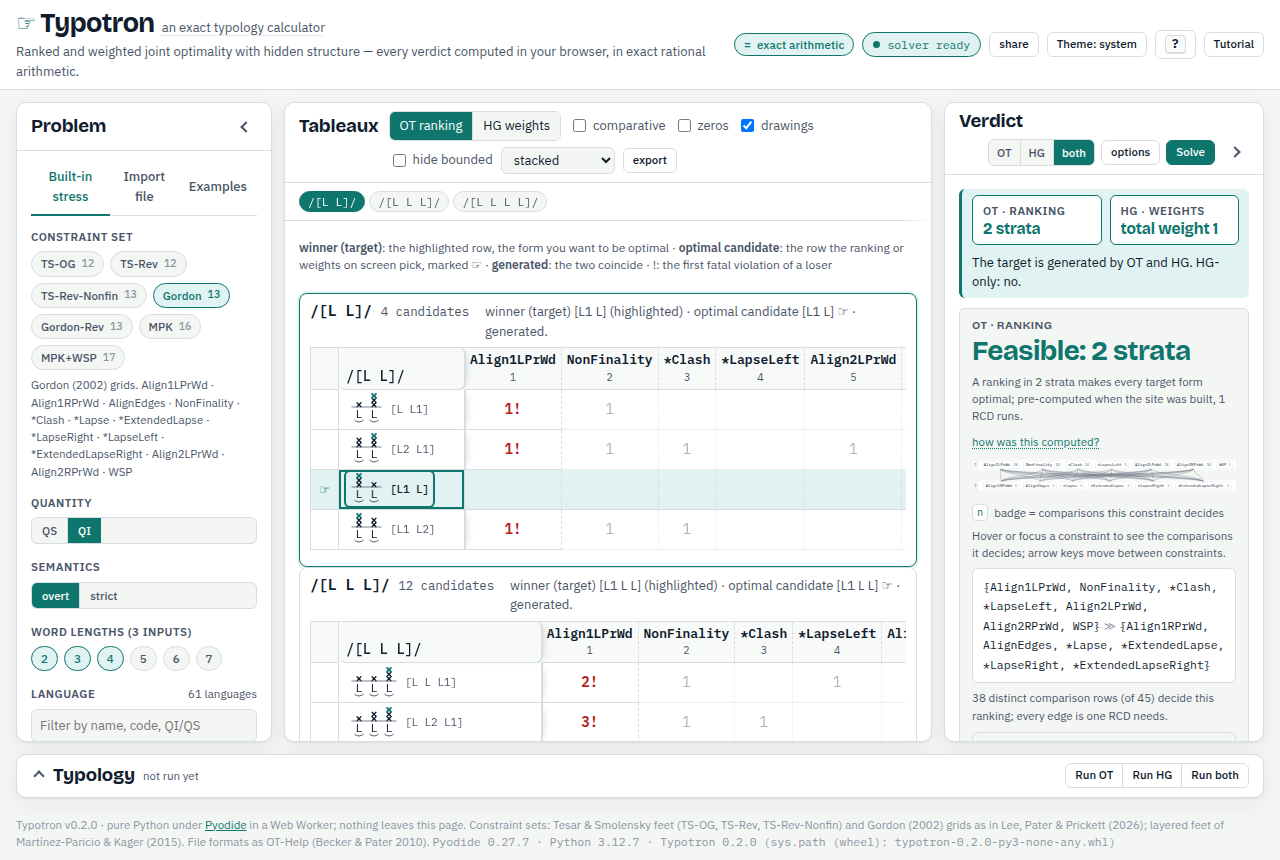
The page is a workbench of three panes and a drawer.
- The masthead carries the name, the = exact arithmetic button, the status pill, and the buttons share, Theme, ? and Tutorial. The pill reads loading the solver… while the solver downloads (about 10 MB the first time; your browser keeps a copy), then solver ready, and names what it is doing while it works. If the solver cannot start, the pill says so and a banner under the masthead explains why, with a Retry button. Under 900 px of width the page becomes one column and Theme, ? and Tutorial fold into a ⋯ menu.
- The Problem pane, left: what you are asking about. Three tabs: Built-in stress, Import file, Examples.
- The Tableaux pane, centre: one tableau per input, live. Drag a constraint header, slide a weight, click a candidate.
- The Verdict pane, right: the theory switch (OT, HG, both), the options menu, the Solve button, and one card per theory with the answer.
- The Typology drawer, bottom: every pattern the constraint set generates on the chosen inputs, and the comparison of constraint sets.

The screenshots on this page are in the light theme. The page follows your system theme unless you choose one with Theme (or T), and this tutorial follows the same choice.
The masthead subtitle opens a dialog called How this verdict was computed. It says, for the verdict on screen, how the ranking was found (how many choices of hidden structure were searched and how many distinct comparison rows the ranking came from), how the weights were found (an exact simplex over rationals, and how many feasibility tests it made), whether the result was computed in your tab or pre-computed when the site was built, and gives the command line that reproduces it (section 15). The verdict cards report the same two counts in their own words: RCD runs is the number of times recursive constraint demotion was run, once per choice of hidden structure the search tried, and LP nodes is the number of feasibility tests of the weight search (LP is linear programming, the exact simplex). The how was this computed? link inside each verdict card opens the same dialog.
The first problem on screen was solved when the site was built, so it appears before the solver has finished loading; the solver confirms it once it is up. Everything you do afterwards is computed in your tab, or on the site's server when it answers.
Without WebAssembly
The solver is Python, run in your browser through WebAssembly. Some browsers have WebAssembly switched off (a managed-browser policy, Lockdown Mode, a privacy extension, or a site policy that forbids it); the page then says so once, in a notice under the masthead, and runs its JavaScript engine instead: the same exact arithmetic (integers and rationals, every ranking, weighting and certificate re-verified against every comparison row) and the same answers, checked field for field against the Python engine on every built-in problem and every test file. The pill reads JavaScript engine ready, and the = exact arithmetic dialog names the engine. The built-in problems were pre-computed when the site was built (their verdicts are re-verified in the page before they are shown; the built-in typologies answer at once and carry the exact ranking counts); pasted files, typed patterns, other word lengths, strict semantics, weights ≥ 1 and every edit are solved in the page. What this mode does not do: ranking volumes and weight shares (the Weight shares button and the count rankings checkbox say so); typologies beyond 4,000 candidates or 20 constraints, which it refuses with a sentence naming the problem's size and the command line to run instead; a typology is stopped after 60 s at the latest and reports the tableau it reached; comparing whole typologies; the layered-feet GEN options and serial problems. A browser that blocks WebAssembly usually blocks the JavaScript JIT too, so a large pasted file solves more slowly there than on this page's Python engine; the built-in problems are instant either way.
3Choose constraints and a language
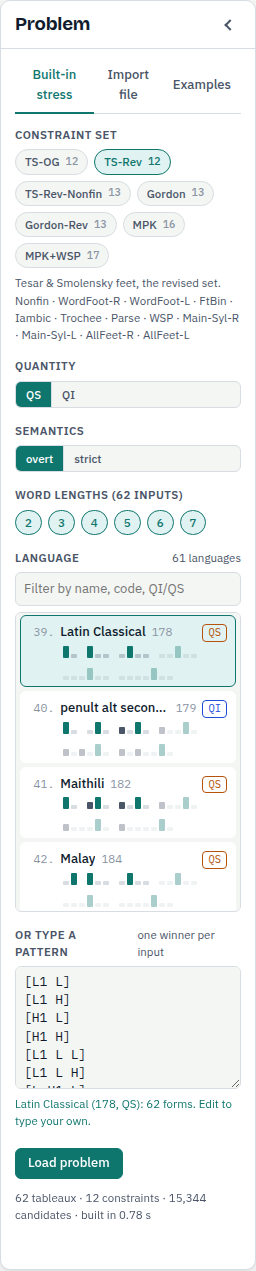
The constraint sets
Seven sets from the literature are built in; each chip shows the number of constraints, and the line under the chips lists them for the chosen set.
- Tesar & Smolensky feet: the original set (TS-OG, 12 constraints), the revised set (TS-Rev, 12) and the revised set with main-stress Nonfinality (TS-Rev-Nonfin, 13: the 13th constraint is Nonfin-main, no primary stress on the final syllable), as restated in Lee, Pater & Prickett (2026). Candidates are footings.
- Gordon (2002) grids: Gordon (13) and a revised Gordon-Rev (13). Candidates are metrical grids.
- Layered feet of Martínez-Paricio & Kager (2015): MPK (16) and MPK+WSP (17), the latter with weight-to-stress. Candidates are layered footings.
Quantity, semantics and word lengths
QS (quantity-sensitive) uses every string of light (L) and heavy (H) syllables of 2 to 5 syllables plus the all-light words of 6 and 7 syllables: 62 inputs. QI (quantity-insensitive) uses the 6 all-light inputs of 2 to 7 syllables. The word lengths chips restrict the inputs to the lengths you tick, and the note beside them counts the inputs that remain.
Semantics says what "the target wins" means when several candidates share an overt form. Under overt (the default here) the chosen structure must beat every candidate of another overt form; the other structures of the same form are not compared with it at all, so one of them may turn out to be the optimal candidate and carry the hand (section 4 shows this). Under strict (the convention of OT-Soft, OT-Help and SoftStress files) the chosen row must beat every other row, including the other structures of its own form.
The language
The gallery lists the 61 StressTyp2 entries of the appendix of Lee, Pater & Prickett (2026): number, name, StressTyp2 code, a QI or QS tag, and a miniature stress strip for every word length. The filter box narrows the list by name, code or tag; the arrow keys move the choice. Picking a language fills the pattern box under the gallery with its winning form for every input; the box is also where you type a pattern of your own (section 9).
Every change in this pane re-loads the problem and re-solves it, so you rarely need the Load problem button; it is there for a typed pattern you want to load now, and it tells you which line to fix if the pattern is not ready. The line under it reports the size of what was built: Latin under TS-Rev on the 62 QS inputs is 62 tableaux, 12 constraints and 15,344 candidates. The Solve button in the Verdict pane (or Enter) re-solves the loaded problem under the theory switch and the options in force.
The Examples tab holds five ready-made problems: Latin under TS-Rev, Latin under TS-OG, the OT-Help manual example, Gordon grids on the QI inputs of 2 to 4 syllables, and Yidin under MPK+WSP.
4Read the tableau
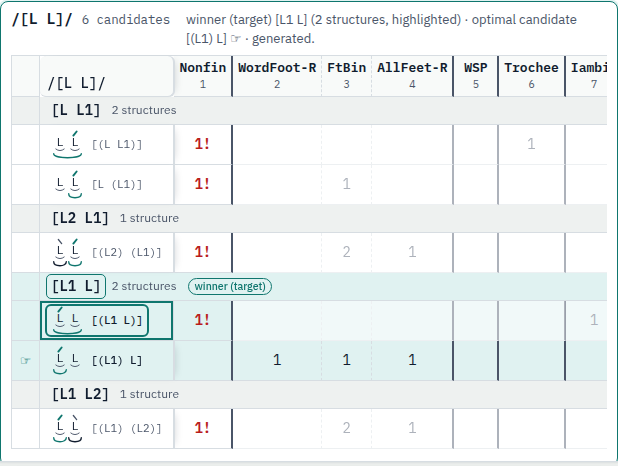
[L1 L] (the target) is tinted; the outline is on the structure the solver compared, [(L1 L)]; the hand on [(L1) L].Reading the drawings
Every candidate is drawn beside its bracket string, and the same drawings appear in the verdict cards and the typology table. A light syllable is an L with a breve under it; a heavy syllable is a bold H with a thick bar. An acute mark over a syllable is primary stress, a grave mark secondary stress. A foot is an arc under its syllables, and the foot that carries primary stress is in the accent colour. In a layered footing of Martínez-Paricio & Kager the inner arc close to the syllables is the minimal foot and the outer arc below it the minimal foot with its adjunct. A Gordon grid is a column of × marks over each syllable: one for every syllable, a second for every stressed syllable, a third (in the accent colour) for the primary; a grid has no hidden structure, so the row is the form itself.
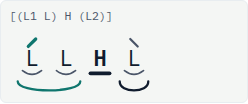
[(L1 L) H (L2)]. The main foot is the coloured arc; the heavy syllable has the bar; the unfooted syllable has no arc.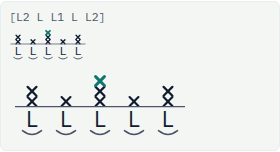
[L2 L L1 L L2], columns of × marks 2, 1, 3, 1, 2 high, the top mark of the primary in colour; above it the same drawing at the size used in tableau rows.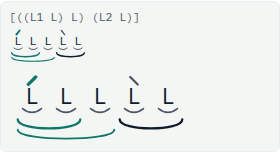
[((L1 L) L) (L2 L)], the minimal foot (L1 L) on the inner arc and its adjunct on the outer one; the second foot is a plain binary foot.The input strip across the top of the pane lists every input; click one to jump to its tableau, or scroll: the tableaux are stacked in input order. The menu beside the toggles (stacked / one at a time) shows all the tableaux or only the current one, and the drawings box hides the foot and grid drawings. Each tableau's header line names the input, the number of candidates, the winner (target) — the form you want to be optimal, the highlighted row — and the optimal candidate under the current ranking or weighting, the row with the hand, and says whether the winner is generated, that is, whether the two coincide. A legend above the tableaux repeats the three terms.
- Candidates are grouped by overt form (
[L L1],[L2 L1], …); each row is one full structure, drawn as feet or a grid beside its bracket string. The group of the winner is tinted and tagged winner (target). The outline marks the structure the solver used in its comparisons: under overt semantics that structure had to beat every candidate of the other forms, and the other structures of the winner's form were not compared with it. The hand marks the optimal candidate under the ranking or weights on screen, and the two can differ: in the figure the solver compared with[(L1 L)], but under the ranking it found Nonfin sits at the top, so its sibling[(L1) L], which does not foot the final syllable, is the optimal candidate and carries the hand. The winner is generated either way, since the hand is on a structure of its form. - Violation marks are the counts in the cells; empty means zero (tick zeros to print the 0s). A candidate that can never win under any ranking or positive weighting carries a bounded tag (hide bounded removes those rows), and optima that share the top carry a tie tag.
- In the OT ranking view the columns stand in ranking order, numbered under the names; a heavier rule closes a stratum and a dashed rule separates constraints tied within one. The first violation that decides against a loser is marked !.
- In the HG weights view each header carries a slider and its weight, an H column gives every candidate's harmony (−Σ weight × violations) with a bar, and the sort by weight button orders the columns by decreasing weight.
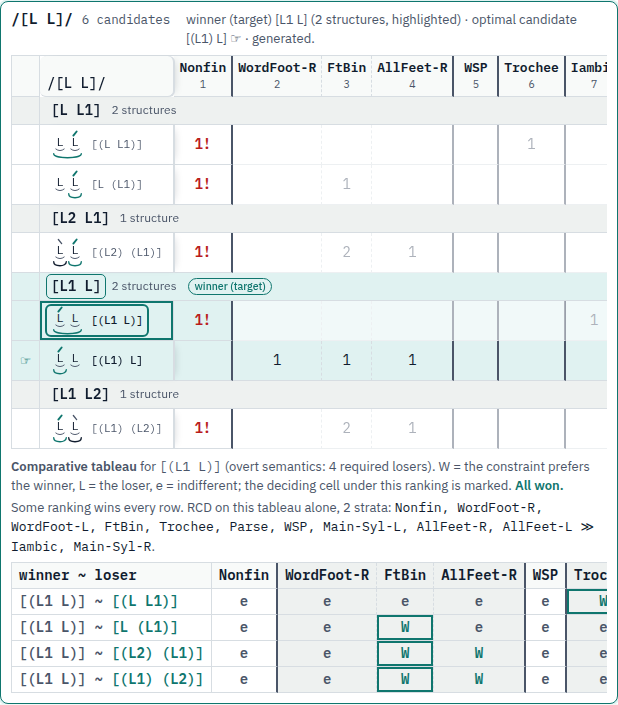
The note under the comparative tableau also runs recursive constraint demotion on this one tableau and prints the strata that tableau alone imposes.
5The ranking
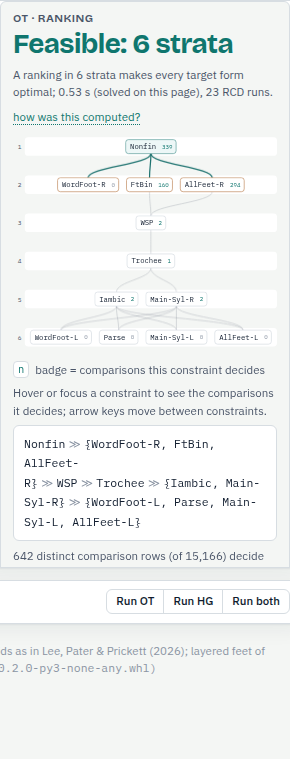
When a ranking exists the headline reads Feasible with the number of strata. The strata are what recursive constraint demotion returns: constraints in the same stratum are not ordered by any comparison, and a total order that realises the strata is the one the tableaux use.
The Hasse diagram draws the strata top to bottom, one band per stratum. An edge from a constraint down to another records a domination this stratification uses: some comparison row has W under the upper constraint, which stands in the highest stratum with a W in that row, and L under the lower one; a domination that a chain of other edges already implies is not drawn. When two constraints of that highest stratum both have W in the row, both get an edge, though a total ranking needs only one of the two. The badge on a node counts the comparisons that constraint decides, and the legend under the diagram says so. Hover or focus a node and the readout under the diagram names its stratum, what it must dominate, and the first of the comparisons it decides, each as a winner–loser pair. A node whose badge reads 0 decides no comparison; it sits below its stratum's neighbours because it prefers a loser in some row that a constraint above it decides. The line under the text form counts the distinct comparison rows the ranking was found from (642 of 15,166 for Latin).
The text form is the ranking as phonologists write it, braces around a stratum:
Nonfin ≫ {WordFoot-R, FtBin, AllFeet-R} ≫ WSP ≫ Trochee ≫ {Iambic, Main-Syl-R} ≫ {WordFoot-L, Parse, Main-Syl-L, AllFeet-L}The chosen structures fold lists, for every input, the full structure the search settled on for the target form, drawn; the options menu's list every feasible choice of structures asks the solver for every choice that works rather than the first. The text report fold fetches the plain-text report of the command line, and its button full report (every tableau) adds every tableau to it.
6The weights
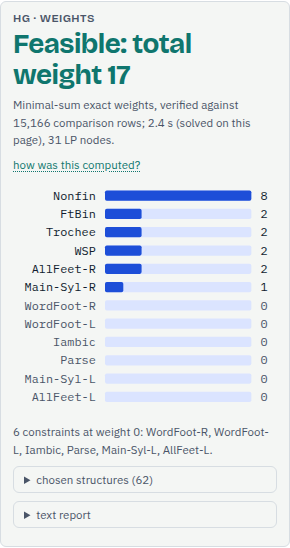
When a weighting exists the headline gives the minimal total: the weights shown are a solution of the smallest possible sum, with every winner at least 1 harmony above every loser. The bars are the weights, sorted, with the exact value at the end of each; a fraction such as 7/2 is printed as a fraction, with its decimal beside it. The line under the headline says how many comparison rows the weights were verified against.
The options menu has weights ≥ 1: the minimal-weight convention of OT-Help, where every constraint carries at least weight 1. Tick it and the weights are found again under that bound on their own (Solve is only needed to re-run by hand); the card then says weights ≥ 1 in its line under the headline, and for Latin the total rises to 65/2. As in the ranking card, the chosen structures and text report folds sit at the bottom.
7When nothing works
Latin under the original Tesar & Smolensky set is the built-in example of failure: pick the TS-OG chip (or the second entry of the Examples tab) and the summary box reads The target is generated by neither theory. Each card then carries a proof instead of a grammar.
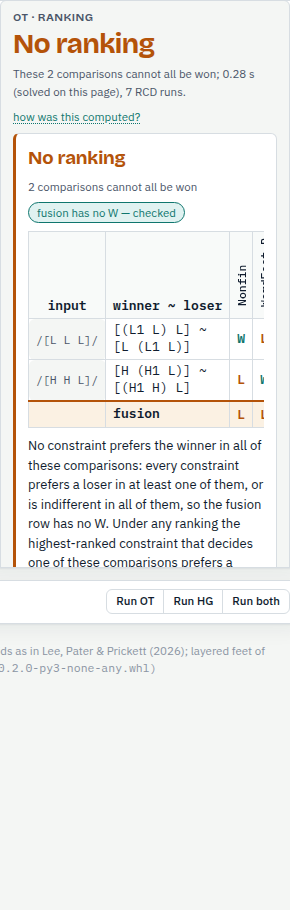
For ranking: residual comparisons and their fusion
Recursive constraint demotion stalls when no constraint can be placed next: every remaining constraint prefers a loser in some remaining comparison. The card shows those residual comparisons as rows of W, L and e, and under them their fusion: L wherever any row has an L, otherwise W wherever any row has a W, otherwise e. A fusion with no W is the proof. Whatever the ranking, the highest-ranked constraint that decides one of these comparisons prefers a loser there, and that comparison is lost. The badge on the card, fusion has no W — checked, means the fusion was recomputed in the browser from the rows shown, independently of the solver. For Latin under TS-OG two comparisons suffice, on the inputs /[L L L]/ and /[H H L]/.
Because the hidden structure is searched, the proof shown is for one branch of the search (the structures listed in the chosen structures fold); every other branch is refuted by a proof of its own, and the one on screen is the one that involves the fewest tableaux.
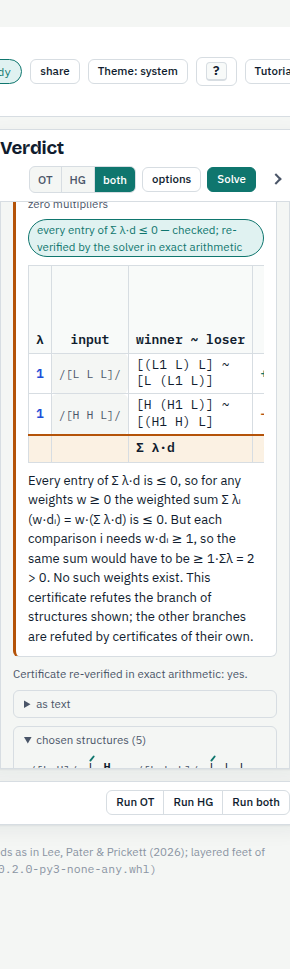
For weighting: the Farkas certificate
A weighting exists when every comparison row d (violations of the loser minus violations of the winner) satisfies w·d ≥ 1 for some w ≥ 0. When none does, there are non-negative multipliers λ on the rows such that the combined row Σ λ·d is ≤ 0 in every constraint. Then for any w ≥ 0 the weighted sum Σ λ (w·d) is ≤ 0, while the requirement w·d ≥ 1 on each row would make the same sum ≥ Σ λ > 0. The card prints the multipliers, the rows and the combined row, with each entry that is ≤ 0 emphasised. The badge, every entry of Σ λ·d ≤ 0 — checked; re-verified by the solver in exact arithmetic, reports two checks: the combined row recomputed in the browser from the rows shown, and the solver's own second check of the certificate with exact rationals, which the re-verification line under the card, Certificate re-verified in exact arithmetic: yes, repeats.
8Try it live
Three things on the page answer at once, without waiting for the solver, because the tableaux are evaluated in the browser itself: dragging a header, sliding a weight, and clicking a candidate. The first two change the grammar and leave the target alone; the third changes the target and asks for a new grammar.
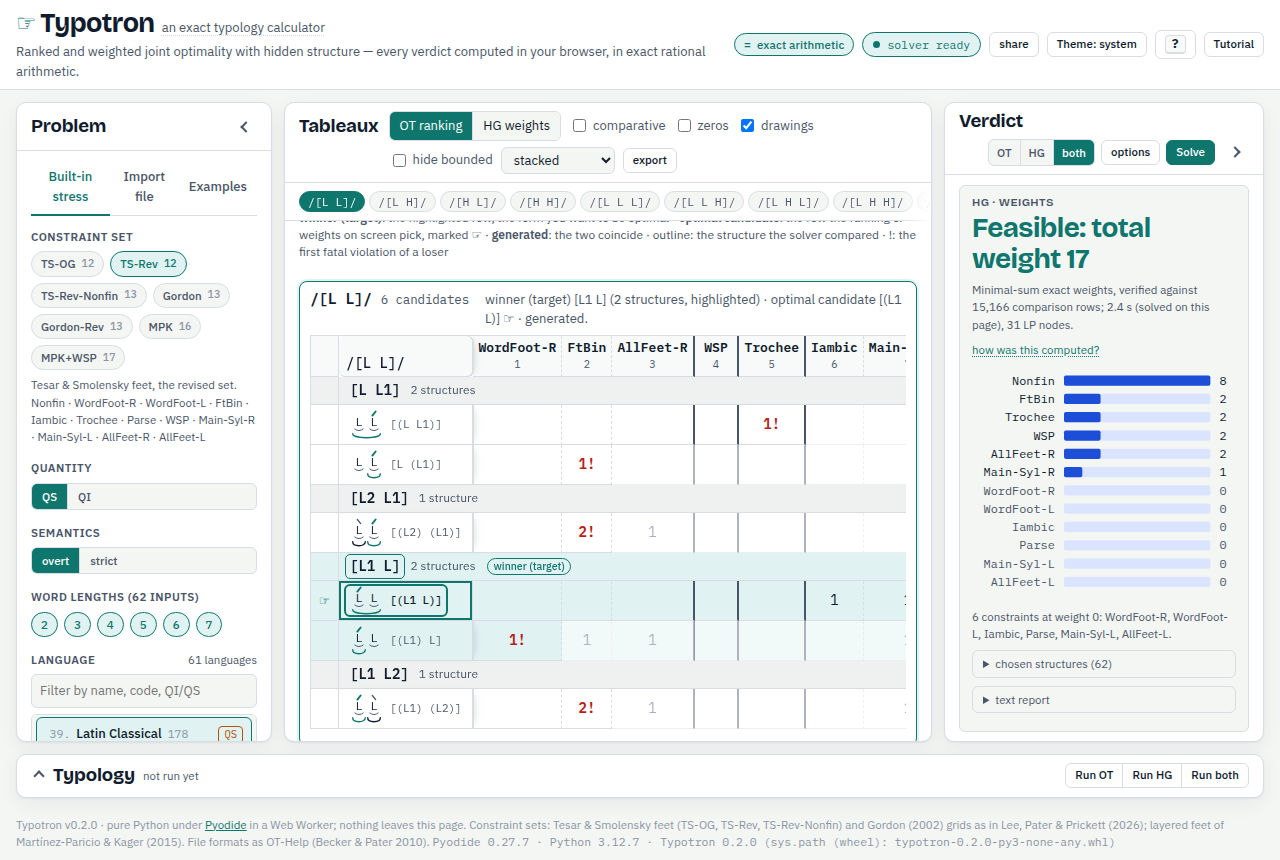
Drag a header to the position you want (with the keyboard: focus a header and press ← or →). The columns re-order, the hands and the fatal marks move, and the Verdict pane redraws the Hasse diagram in the new order with a Live ranking note that says whether the target is still generated in every tableau, naming the tableaux where it is not; each name is a link to that tableau. Back to the solved ranking restores the witness.
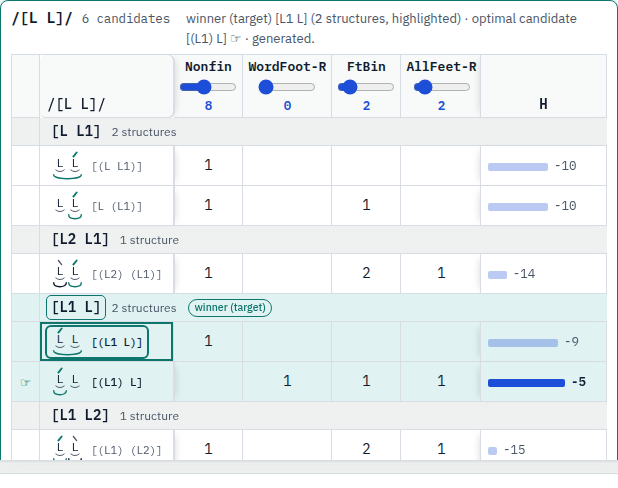
[(L1) L] at −5. The harmony column and the weight bars in the Verdict pane follow at once, and the live note reports the target lost in 1 of 62 tableaux, /[L H]/.Slide a weight in the HG view (the sliders run from 0 to 20 in quarters; ↑ and ↓ on a focused header step them). The harmonies, the hands and the bars update, and the HG card carries a Live weights note of the same kind, with back to the solved weights.
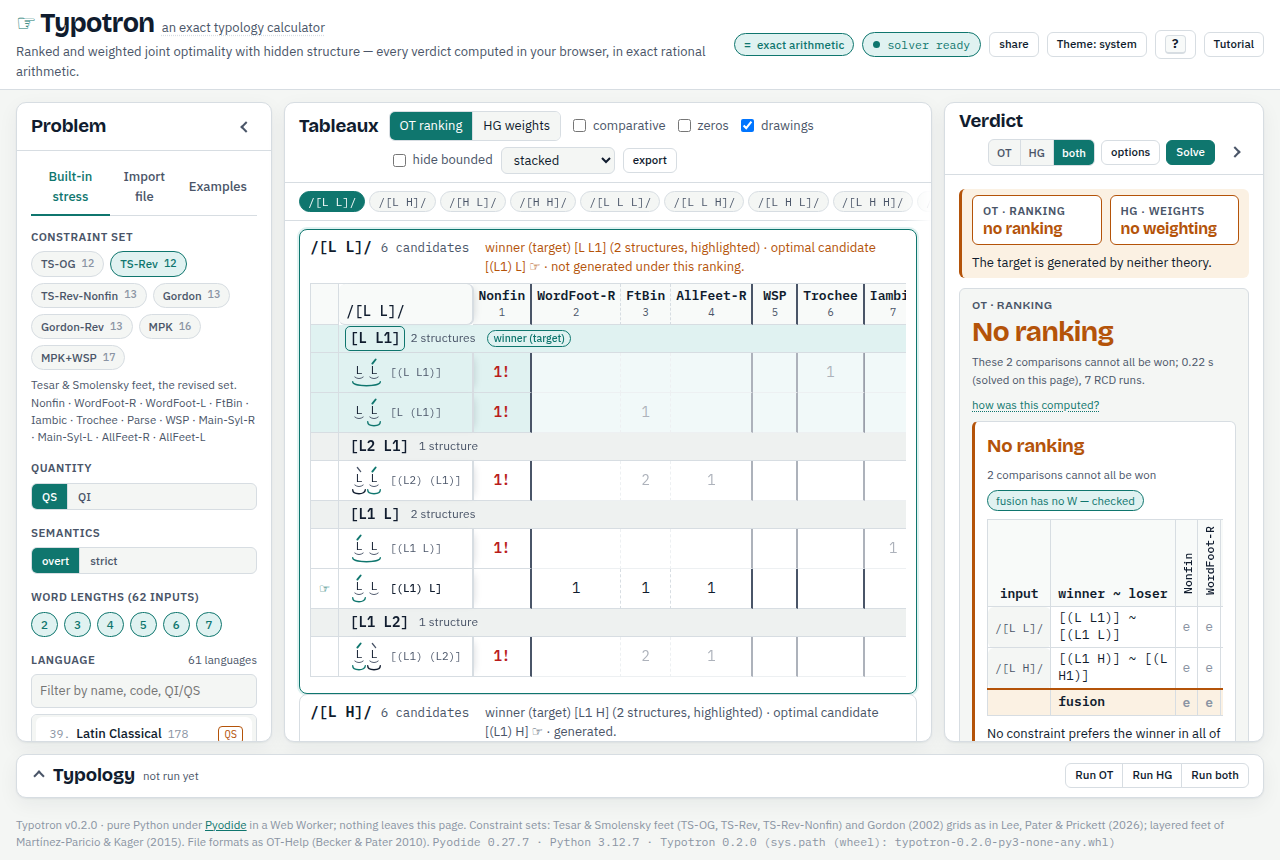
[(L L1)] was clicked in /[L L]/: the header now reads winner (target) [L L1] (2 structures, highlighted) · optimal candidate [(L1) L] ☞ · not generated under this ranking, the problem re-loads as a typed pattern (Latin with final stress on disyllables) and re-solves, and the tiles read no ranking and no weighting.Click a candidate and it becomes the intended winner for that input: the problem is re-loaded as a typed pattern (the language card is deselected and the pattern box shows the new form), both verdicts are re-solved, and the diagram moves to the new solution or to a certificate. Clicking the header of an overt-form group instead makes that form the winner with every structure allowed. For a pasted file the click becomes a winners override (section 10).
9Your own pattern
The box Or type a pattern under the language gallery takes one winning form per input, in input order, one per line. Two spellings are accepted:
- Bracket forms such as
[L1 L]or[L L1 H]: the syllable weights of the input in order,1after the syllable with primary stress,2after a syllable with secondary stress. - Digit strings such as
010: one digit per syllable,0unstressed,1primary,2secondary. The page converts them to bracket forms with the input's weights.
Each line is checked as you type against the inputs you selected: the syllable count and weights must match the input, and exactly one syllable must carry primary stress. A valid pattern loads and solves on its own; an invalid one holds every load until it is fixed, and the lines to fix are listed under the box.
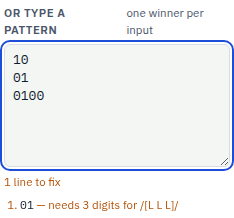
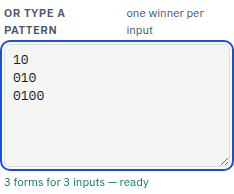
A worked example. Choose Gordon, QI and the word lengths 2, 3 and 4, so the inputs are /[L L]/, /[L L L]/ and /[L L L L]/. Type
10
010
0100
for initial stress on the disyllable and peninitial stress on the longer words. The status turns to 3 forms for 3 inputs — ready, the page loads the pattern and solves it, and the Verdict pane reports that the pattern is generated by both OT and HG under Gordon's grid constraints. Type 01 for the second line instead and the status says 1 line to fix: 01 — needs 3 digits for /[L L L]/.
10Your own file
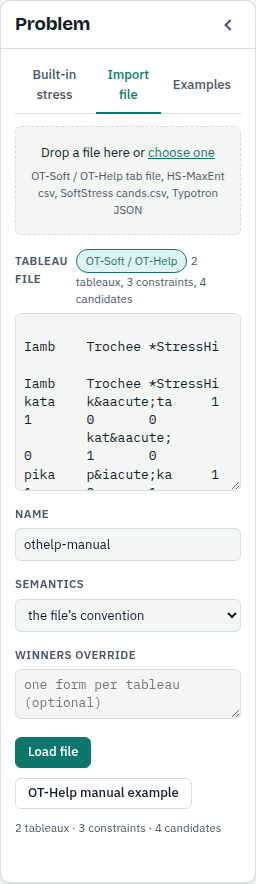
The Import file tab takes a tableau file: drop it on the dashed zone (or anywhere on the pane), press the zone to choose one, or paste its text into the box. Four formats are read.
- OT-Soft / OT-Help tab-separated files: line 1 holds three tabs and then the constraints' long names, line 2 three tabs and then their short names, and every other line is input, candidate, a winner flag (
1or empty) in column 3, then one violation count per constraint. An empty input cell continues the previous tableau; an empty count is 0; HTML entities such asáare decoded as OT-Help writes them. - Hidden-Structure-MaxEnt csv, where
p = 1marks the winners. - SoftStress
cands.csv: candidates without violations, so only a typology can be run after violations are added. - Typotron JSON, the form the page itself exports.
The badge next to Tableau file names the format the page recognised, and the counts (tableaux, constraints, candidates) appear once the solver has read the text. Name labels the problem in reports and downloads. Semantics is the file's own convention by default, which is strict for OT-Soft and OT-Help files and overt for JSON and MaxEnt csv; choose overt or strict to override it. Winners override takes one form per tableau, in file order, and replaces the winner flags in the file; a candidate clicked in the tableau lands here. Load file loads and solves; the button OT-Help manual example fills the box with the two-tableau example of the OT-Help manual (kata, pika; Trochee, Iamb, *StressHi), whose ranking is Trochee ≫ {Iamb, *StressHi} and whose minimal weights are Trochee = 1 (total 1).
A file longer than the share link can carry stays out of the link; everything else about it (name, semantics, override) travels.
11Predicted patterns
The Typology drawer at the bottom of the page (open it with a click or Y) enumerates every pattern the loaded constraint set generates on the loaded inputs: the factorial typology. Run OT lists the patterns some ranking generates, Run HG those some weighting generates, and Run both enumerates under HG and tests each pattern for a ranking, so the HG-only count is the number of patterns a weighting generates and no ranking does.
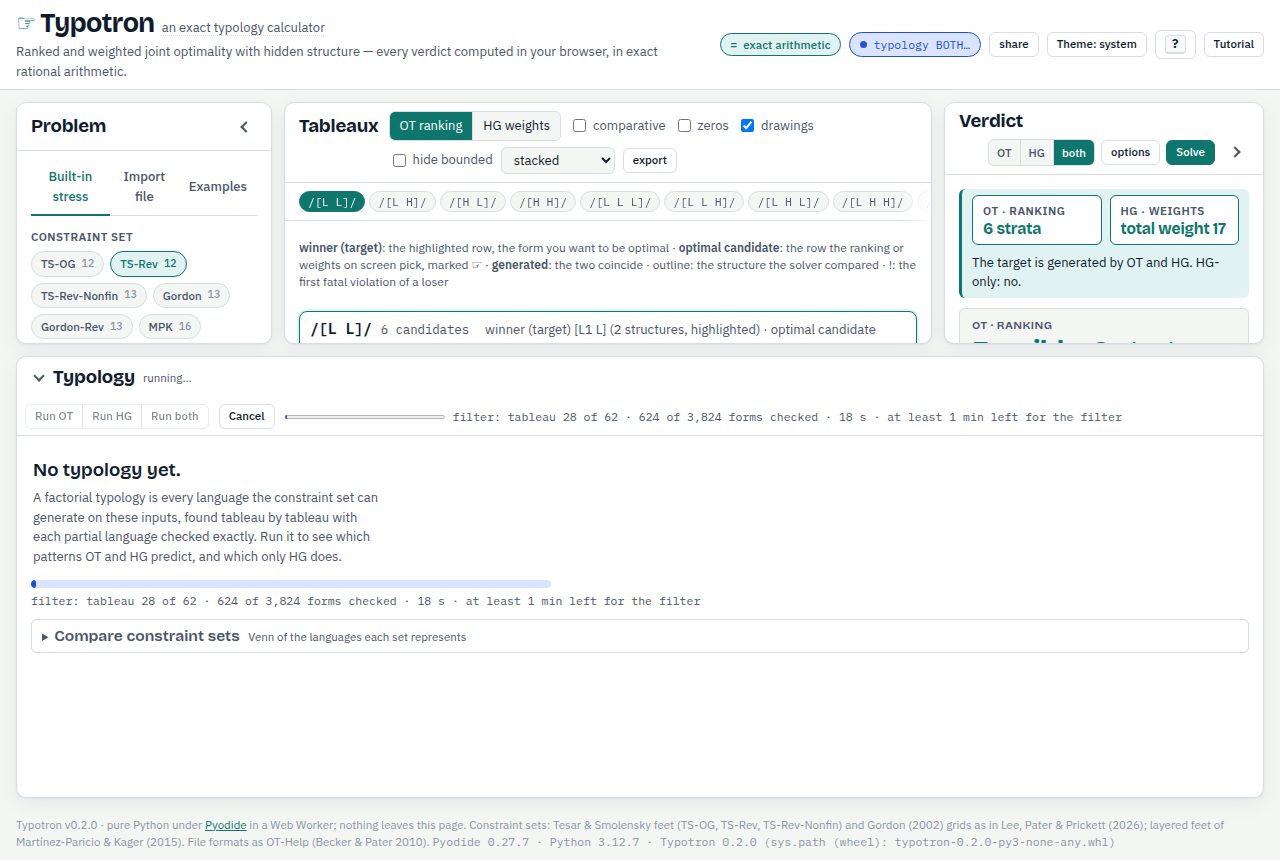
The progress line reports the tableau being processed, the partial patterns alive, the number of exact checks made and the time, and then the remaining time as far as it is known: during the filter (one check per candidate form of every tableau, before any pattern is extended; for Latin under TS-Rev this stage alone takes minutes in the browser) N of M forms checked and at least N left for the filter; after each tableau at least N left, a floor computed from the next tableau's exact number of checks (partial patterns alive × forms alive in that tableau) at the speed just measured, revised after every tableau; inside a long tableau the bar moves and the line reads about N left for this tableau; during the OT test about N left. The bar cannot promise a total, because each tableau costs roughly ten times the one before, so a floor that keeps growing means the run is blowing up: cancel it and shorten the word lengths. Cancel stops the run. The cost grows quickly with the word lengths, about thirteen times per added length. Measured for TS-OG on the QI inputs: word lengths 2 to 4 (the run shown, 46 patterns) took a few seconds; 2 to 5 (168 patterns) took 55 seconds in the browser; 2 to 6 (482 patterns) took six minutes on the command line, and the browser runs the search about twice as slow; and all six lengths, 2 to 7, did not finish within 25 minutes in either. So run the long lengths from the command line (section 15), use Cancel when a run in the browser is not worth waiting for, and leave the QS sets on all 62 inputs to the command line.
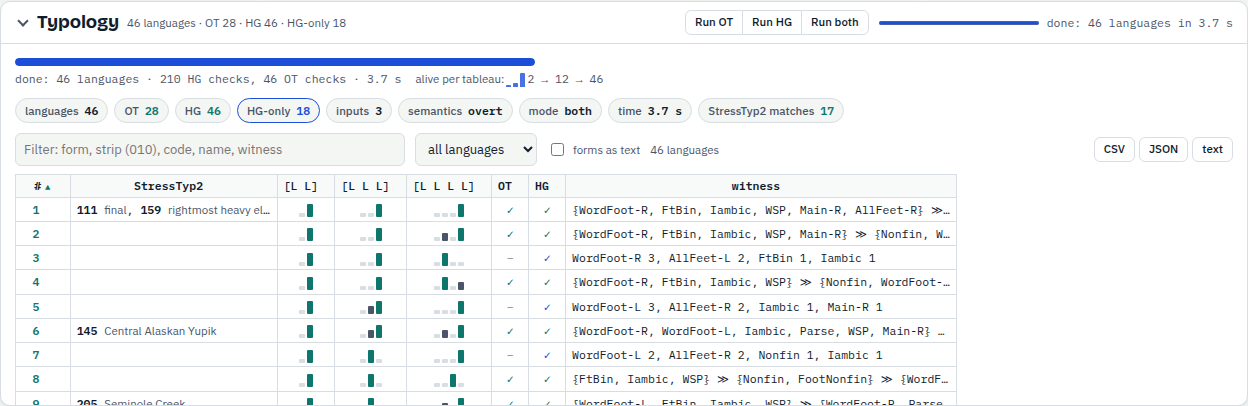
The table has one row per pattern: its winner for every input as a stress strip (tick forms as text for the bracket forms), the StressTyp2 codes and names it coincides with on these inputs, an OT tick and an HG tick, and the ranking conditions: the pairwise rankings every ranking that generates the pattern must obey, as Iamb ≫ Trochee; *StressHi (Iamb above Trochee; *StressHi anywhere), with the RCD ranking (its strata, top first) in the cell's tooltip and in the downloads; a row only HG generates shows its minimal weights instead (What Typotron is, section 7, says how the conditions are computed). Every column sorts; the filter box matches forms, strips such as 010, codes, names, conditions and rankings, and the menu beside it keeps only the OT, HG, HG-only or not-OT rows. Click a row (or its Load button) to load that pattern into the workbench as the winners: the tableaux and both verdicts follow. The CSV, JSON and text buttons download the table (with the all lengths column once Certify has run; the catalog column stays on the page, and typotron typology FILE --catalog writes it).
A new problem on other inputs or constraints clears the table; new winners on the same tableaux keep it.
How many rankings, how much weight space
Two more columns say how much of each theory's grammar space a pattern occupies. The rankings column is the pattern's ranking volume (the r-volume of Riggle 2010; Bane & Riggle 2008): the number of the n! total rankings of the n constraints under which its winners are optimal in every tableau, with its share of n! beneath. It is counted exactly with the run when count rankings is ticked (the default; free up to 20 constraints). The weight share column is the analogue for weighted grammars: the fraction of the simplex of non-negative weights summing to 1 under which the winners are optimal; press Weight shares to fill it. A number without a mark is exact (a dynamic programme over ranked prefixes; a polytope volume in rational arithmetic); ≈ marks a sampled estimate, with its interval, the number of samples and the seed in the tooltip. What Typotron is, section 7, says what the two measures are, how they are computed and where they stop.
The OT-Help manual example (section 15's manual.txt: Iamb, Trochee, *Stress/Hi; kata and pika) shows the numbers by hand. Of the 6 rankings, katá piká is generated by 3 (Iamb ≫ Trochee ≫ *Stress/Hi, Iamb ≫ *Stress/Hi ≫ Trochee, *Stress/Hi ≫ Iamb ≫ Trochee), káta píka by 2 (Trochee on top) and káta piká by 1 (*Stress/Hi ≫ Trochee ≫ Iamb); katá píka by none. In weight space káta wins when Trochee outweighs Iamb and píka when Trochee outweighs Iamb and *Stress/Hi together, so katá piká holds half of the simplex, káta píka a quarter (Trochee above ½), káta piká the remaining quarter. The loaded pattern's own numbers appear under the verdicts as rankings and weight share, and how was this computed? names the states, rays and faces behind them.
Does the pattern hold on longer words?
A row of the table is a pattern on the loaded inputs: six words of 2 to 7 syllables in a full quantity-insensitive run, three of 2 to 4 in the run of the figure below. When the run stops short of 7 syllables the witness's own optima fill the missing lengths before the rule is read off, and the cell's tooltip says so (the 2-4 forms, continued to 7 by the witness, declare). Press Certify to ask, for every row, whether the witness the row shows (its ranking, or its minimal weights; the select beside the button picks the theory, the second select the length the exact check runs to) keeps that pattern on words of every length. The answer goes in the all lengths column in one of six forms. all lengths with from 8 · exact beneath is a certificate: the pattern's repeating family is the unique optimum of the witness on every word of 8 or more syllables, and exact dynamic programming checked every length from 2 to 40. all lengths ≠ is a certificate too, but for a pattern other than the one the 2-7 forms declare, from the length shown. to 40 with verified beneath means no tie and no change up to 40 syllables and no certificate; nothing is claimed beyond 40. ties at n names the first length at which two or more forms are optimal under the witness, fails at n the first length at which the witness gives a form other than the continuation of the 2-7 forms (the cell shows it), and no rule says the 2-7 forms declare no periodic rule (period 1 or 2 from length 4), so only the witness's own family is reported. Every cell's tooltip gives the family, the size of the certificate or the reason there is none. The chip under the head adds up the verdicts, and the column sorts with the certified rows first.
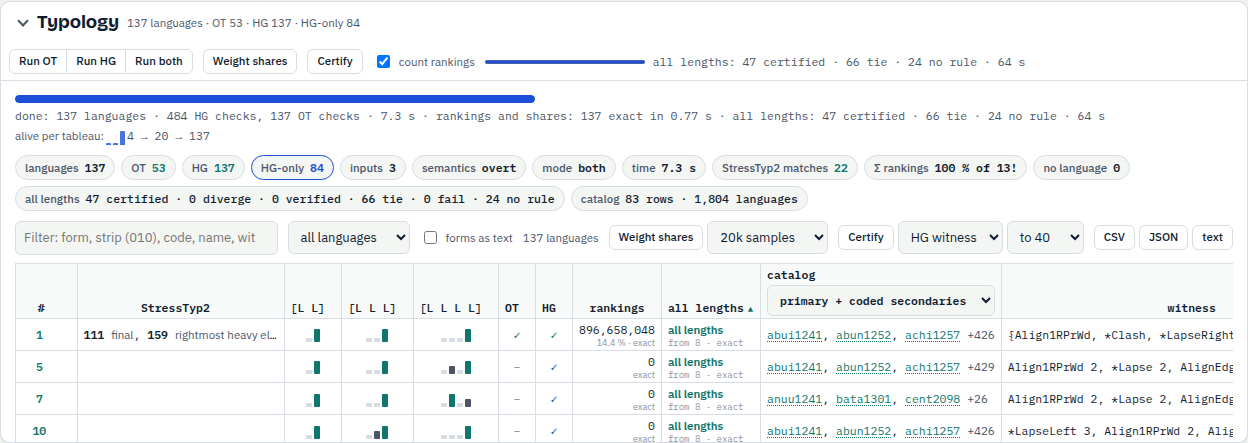
Two languages by hand. Language 112 (initial stress) under Gordon: the minimal weights are Align1LPrWd = 1 and nothing else, and that constraint counts, for every stressed syllable, the syllables to its left. So on three syllables [L1 L L] costs 0 and every other form costs at least 1 ([L L1 L] 1, [L1 L2 L] 1, [L L L1] 2), and the same holds at every length, since any other form has a stress away from the left edge. The certificate says this for all lengths at once: the family L1 L (L)* L costs 0 at every length and every other form costs at least 1 (64 terms over 10 product states, the secondary stresses confined to the first syllable by the removal lemma), so the cell reads all lengths under both witnesses (under the ranking the top constraint, Align1LPrWd, decides alone). Language 113 (stress on the second syllable): its ranking is certified from 8 as well, but its minimal weights (*LapseLeft 5, Align1RPrWd 3/2, *ExtendedLapse 1, Align1LPrWd 1/2) tie at 8 syllables. Four of the 1,024 forms of eight syllables cost 27/2 there: the pattern's continuation [L L1 L L L L L L] (Align1LPrWd 1 × 1/2, Align1RPrWd 6 × 3/2, *ExtendedLapse 4 × 1) and the forms with the stress on the sixth, seventh or last syllable, each paying *LapseLeft once (5) and a different mix of the two alignment constraints. The cell reads ties at 8 with 4 forms beneath and the tooltip lists them. The tie is a fact about that weighting, a corner of the region that generates the pattern; the row is still a language of the typology on its inputs.
The loaded language gets its own line under the verdicts: all lengths → computes it, then each witness reads its sentence with a certificate → link that downloads the certificate (families, potentials, windows) as JSON, and how was this computed? gains a part All lengths. From the command line, typotron stress --set Gordon --quantity QI --lengths 2-7 --language 112 --certify prints the same two lines, and typotron certify-check FILE re-verifies a downloaded certificate without searching.
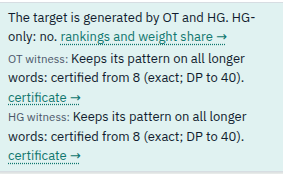
What the verdicts mean, and where they stop:
- The certificate is about one witness, the ranking or the weighting in the row, on all-light words. Other rankings or weightings that generate the same 2-7 forms can behave differently on longer words: under Gordon the weightings generating initial stress (112) split at 8 syllables, 99.86 % of the region keeping initial stress and 0.14 % going to final, penultimate or antepenultimate stress (exact shares); whether some witness of a row extends is the closure question, open under gradient alignment. Load another witness to certify it.
- A quantity-sensitive row is certified on all-light words only; heavy syllables beyond five are not covered. On a quantity-sensitive problem the line under the verdicts is labelled OT witness (all-light words), the all-lengths column's header tooltip says so, and how was this computed? repeats it.
- verified to 40 is not a certificate: it is an exact computation to 40 syllables and no claim beyond. It happens when the pattern's repeating block carries a gradient alignment locus (alternating secondary stresses under Gordon or the Tesar and Smolensky sets), when no periodic family appears by 40, or when the bound does not close; the tooltip says which.
- Minimal-sum weightings are corners of the feasible region and often tie at 8 to 11 syllables: 23 of the 41 Gordon weightings of the StressTyp2 languages, 9 of 40 under TS-Rev, 3 of 47 under MPK; the rankings are stabler (2 of 41 change their pattern at 8, 0 of 40, 1 of 46 tie). These are facts about the witness; the row is still a language of the typology on its inputs.
- The declared continuation is read from the six forms of lengths 2 to 7 (period 1 or 2 from length 4); 4 of the 61 StressTyp2 languages declare none (144 Cayuvava, 158 Georgian, 169 Icua Tupi, 171 Ioway Oto) and get the witness's own family only. A witness can be certified to a pattern other than the declared one (117 and 118 under TS-Rev weights: the secondary stresses stop alternating).
- Ties are failures of the pattern, not of the language: a tie between two forms means the witness does not decide; a tie between two structures of one form is not a tie (overt semantics).
- A certificate takes about 0.1 s per witness on the command line for grids and feet (Gordon QI 2-4: median 0.14 s, at most 0.56 s per weighting) and one to three seconds on layered feet (MPK: median 1.0 s per weighting, 2.7 s per ranking, at most 4.4 s); the browser runs about twice as slow (all 137 weightings of Gordon QI 2-4 in 53 s, the 53 rankings in 49 s, both witnesses of a layered-feet language in 6.8 s). Certify on a whole table runs behind the progress bar with Cancel.
Which catalog languages have this pattern?
The catalog column lists, for every row, the languages of the Word Stress Catalog whose stress strings agree with the row. The page carries a named snapshot of the catalog's release (2026-09-21, V9.15), named in the column's popover: 1,964 of its entries have stress strings (1,545 without syllable weights, 419 with them; 250 of them code a secondary stress). A record matches a row when it has a string for at least two of the row's inputs and agrees on every input it covers; a record with fewer strings than the row has inputs matches partially, and the tooltip counts those apart. The select in the column header chooses how strings are compared: primary + coded secondaries (the default) compares the position of primary stress, and the secondary stresses only where the catalog codes them, since most entries state none; whole strings requires equality. The cell shows up to three glottocodes, each a link to the language's page in the catalog's bibliography, then +N for the rest; its tooltip names the first five with their kind (fixed, weight, weight-hedged) and whether the entry is exceptionless. Click the cell for the whole list, with a glottolog link beside every code and covers k of m for the inputs each record has. The chip reads catalog: 83 rows · 1,804 languages for Gordon on the QI inputs of 2 to 4 syllables: 83 of the 137 rows have a catalog language matching on every input, and 1,804 distinct catalog languages are matched in full by some row; the initial-stress row alone matches 351 on all three inputs and 12 more on two.
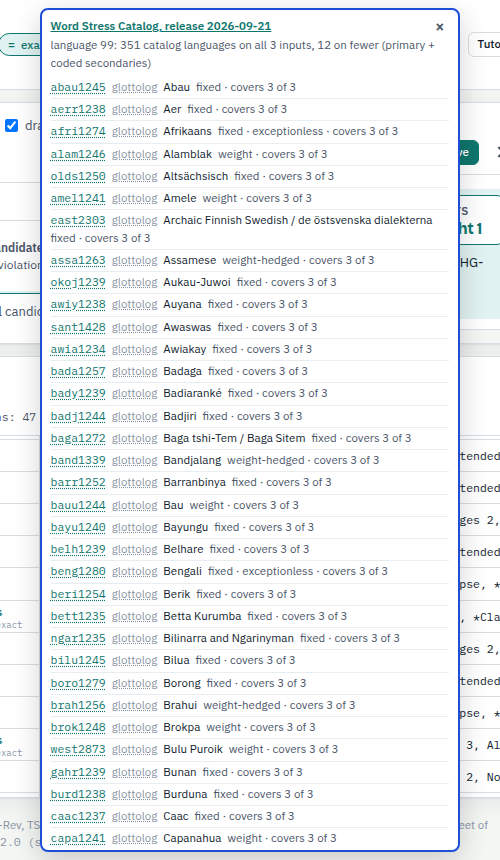
The column compares strings, not analyses: a match is not a claim that the constraint set analyses that language, only that the stress strings the catalog derives from the entry's own rule agree with the row's forms on the inputs both have. Secondary stress is compared only where the catalog codes it, so under the default two languages that differ only in secondary stress the catalog does not state are matched by the same row. The strings come from each entry's own rule by the catalog's published script, and the link opens the entry on the public bibliography page (the catalog page itself has no per-entry address). The file is a snapshot of the release named in the popover's head; rebuilding the page from a newer release replaces it.
12Compare sets on StressTyp2
The fold Compare constraint sets at the bottom of the drawer draws the Venn diagram of the languages two to four constraint sets can represent. On the StressTyp2 universe every language of the chosen quantity is solved under every set, one verdict per cell; on the generated-patterns universe the full typologies are compared instead.
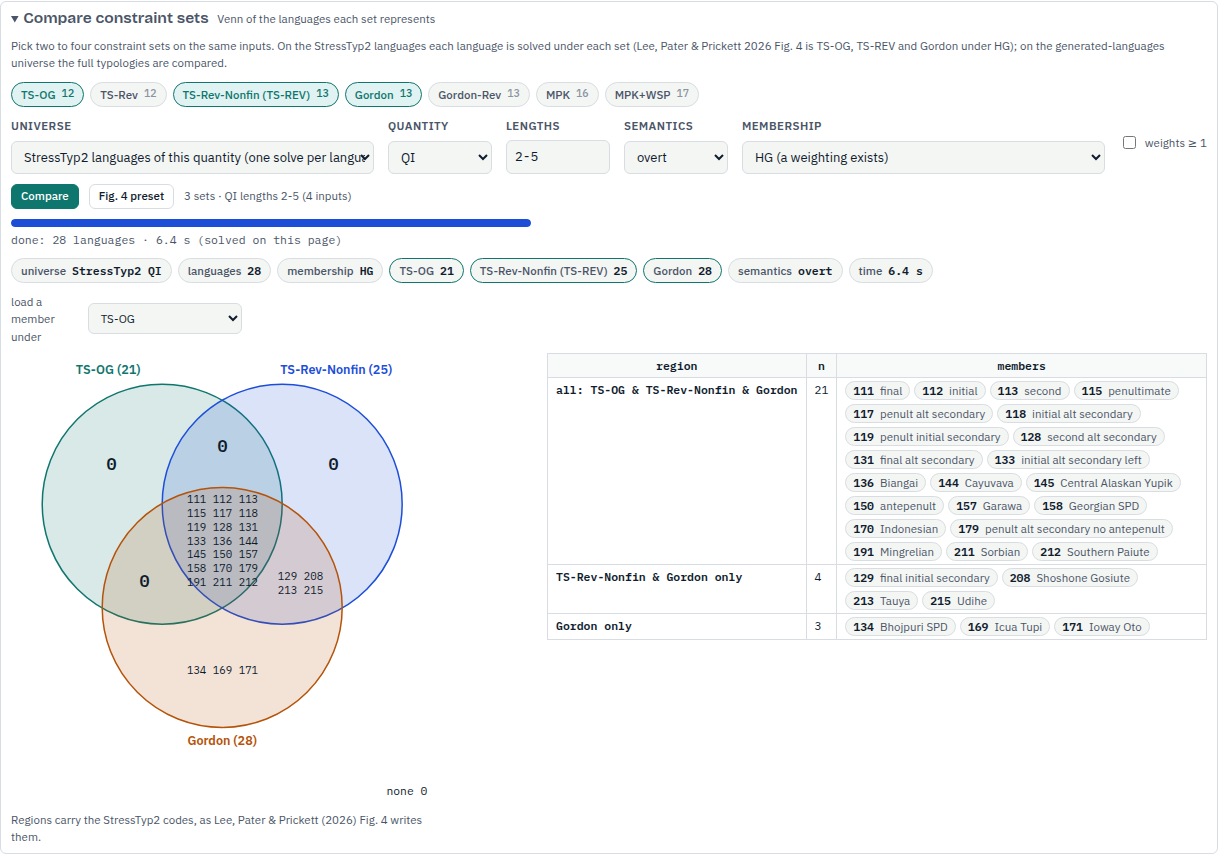
Pick the sets with the chips, then the universe, the quantity, the word lengths, the semantics and the membership (a weighting exists, a ranking exists, or both tested). Compare runs it with a progress line and a Cancel button. The Venn shows the region counts, or, on the StressTyp2 universe, the StressTyp2 codes written into the regions as Figure 4 of Lee, Pater & Prickett (2026) does; a click on a region or on a set name lights its rows in the table beside it, where every member is a chip that loads that language into the workbench under the set chosen in load a member under.
The Fig. 4 preset sets up the paper's own computation: TS-OG, TS-REV (which is TS-Rev-Nonfin here) and Gordon on all 61 languages under HG, the QI languages on the QI inputs and the QS languages on the QS inputs, merged into one diagram. Its note quotes the paper's regions (31 in all three, 7 in TS-REV only, 5 in TS-REV and Gordon, 5 in Gordon only, 13 in none); the QS half takes minutes in the browser.
13Export and share
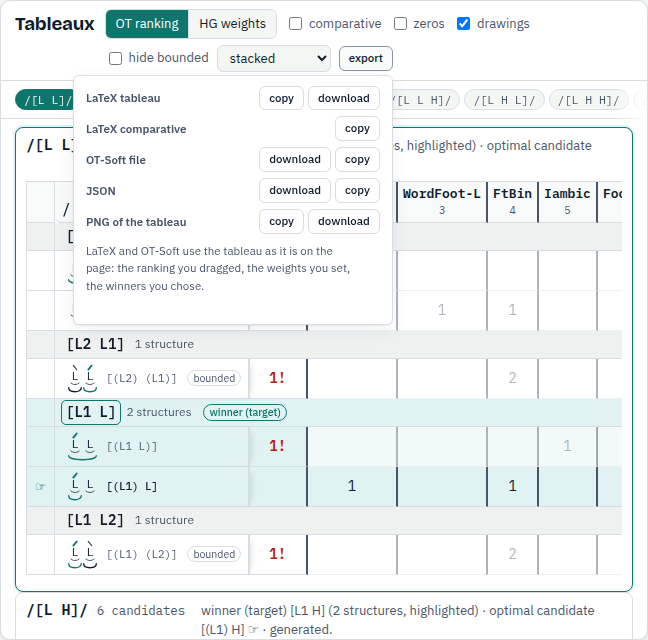
- LaTeX tableau: a
tabularof the current tableau with\handbefore the optimal candidates and*!on the fatal violation of each loser, as ranked or weighted on the page (asterisks, or the integers when a count exceeds 6; a weights row and an H column under weights). copy puts it on the clipboard, download writes a.texfile with a preamble. - LaTeX comparative: the comparative tableau, W / L / e or the signed differences with Σ w·d.
- OT-Soft file: the loaded tableaux with the winner marks, readable by OT-Help, OT-Soft and the command line. The download writes plain UTF-8; copy writes HTML entities for non-ASCII letters, as OT-Help does.
- JSON: the problem, the live ranking and weights, the results and the typology as one document.
- PNG of the tableau: the current tableau as an image at twice the screen resolution, copied or downloaded.
LaTeX and OT-Soft use the tableau as it stands on the page: the ranking you dragged, the weights you set, the winners you chose. The Typology drawer has its own CSV, JSON and text downloads (section 11).
The share button in the masthead (or S) copies a link that reproduces the view: the constraint set, quantity, word lengths, language or typed pattern, semantics, the theory switch, the weights ≥ 1 option, the current tableau and which side panes are folded or open; a pasted file travels in the link too unless it is long. The other option (list every feasible choice of structures), the comparative view and the drawer do not travel. Opening the link in another browser loads and solves the same problem.
The report is the plain-text account of the command line: open the text report fold in a verdict card for the brief report, press full report (every tableau) for the one with every tableau, and copy to take it.
14Keyboard shortcuts
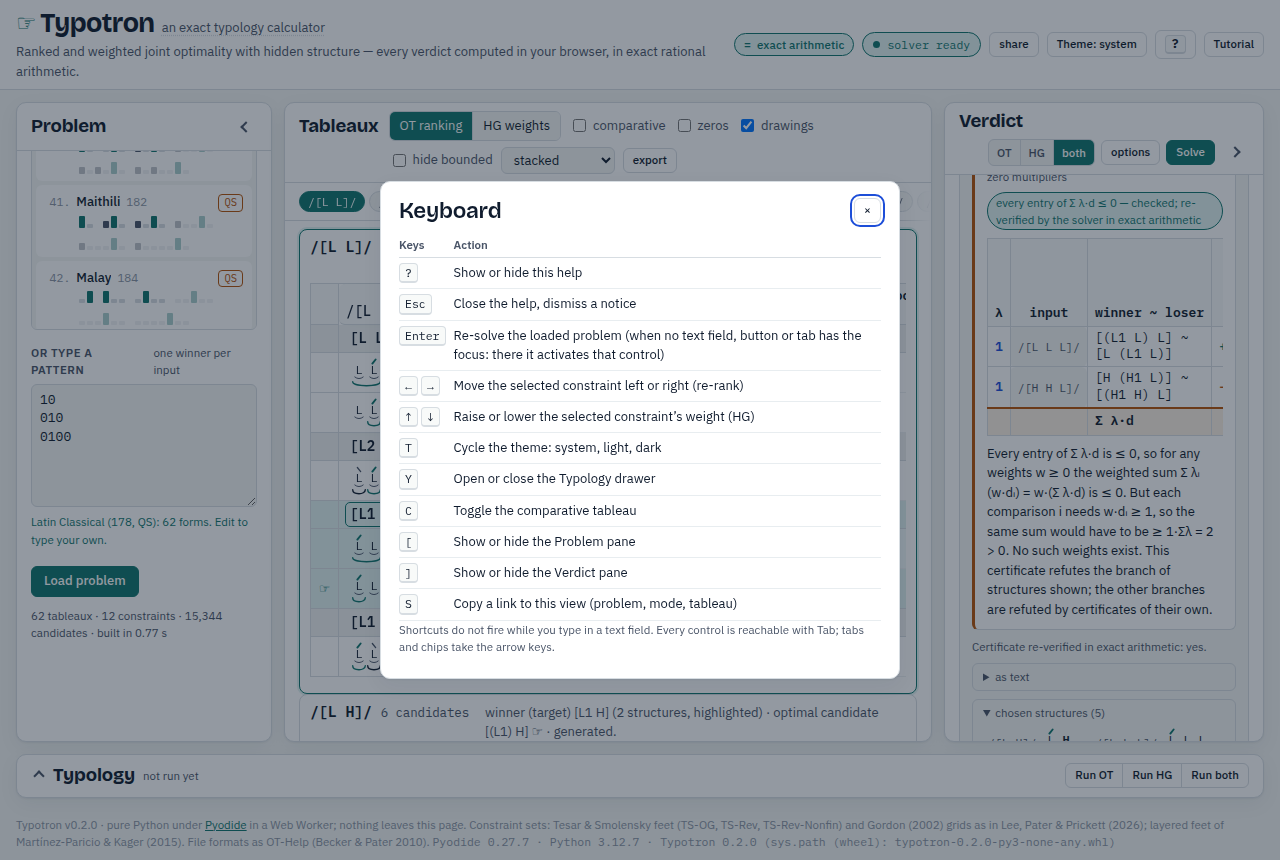
Press ? anywhere on the page for this table. Shortcuts do not fire while you type in a text field; every control is reachable with Tab, and tabs, chips and the gallery take the arrow keys.
| Keys | Action |
|---|---|
| ? | Show or hide this help |
| Esc | Close the help, dismiss a notice |
| Enter | Re-solve the loaded problem (when no text field, button or tab has the focus: there it activates that control) |
| ←→ | Move the selected constraint left or right (re-rank) |
| ↑↓ | Raise or lower the selected constraint's weight (HG) |
| T | Cycle the theme: system, light, dark |
| Y | Open or close the Typology drawer |
| C | Toggle the comparative tableau |
| [ | Show or hide the Problem pane |
| ] | Show or hide the Verdict pane |
| S | Copy a link to this view (problem, mode, tableau) |
15Reproduce from the command line
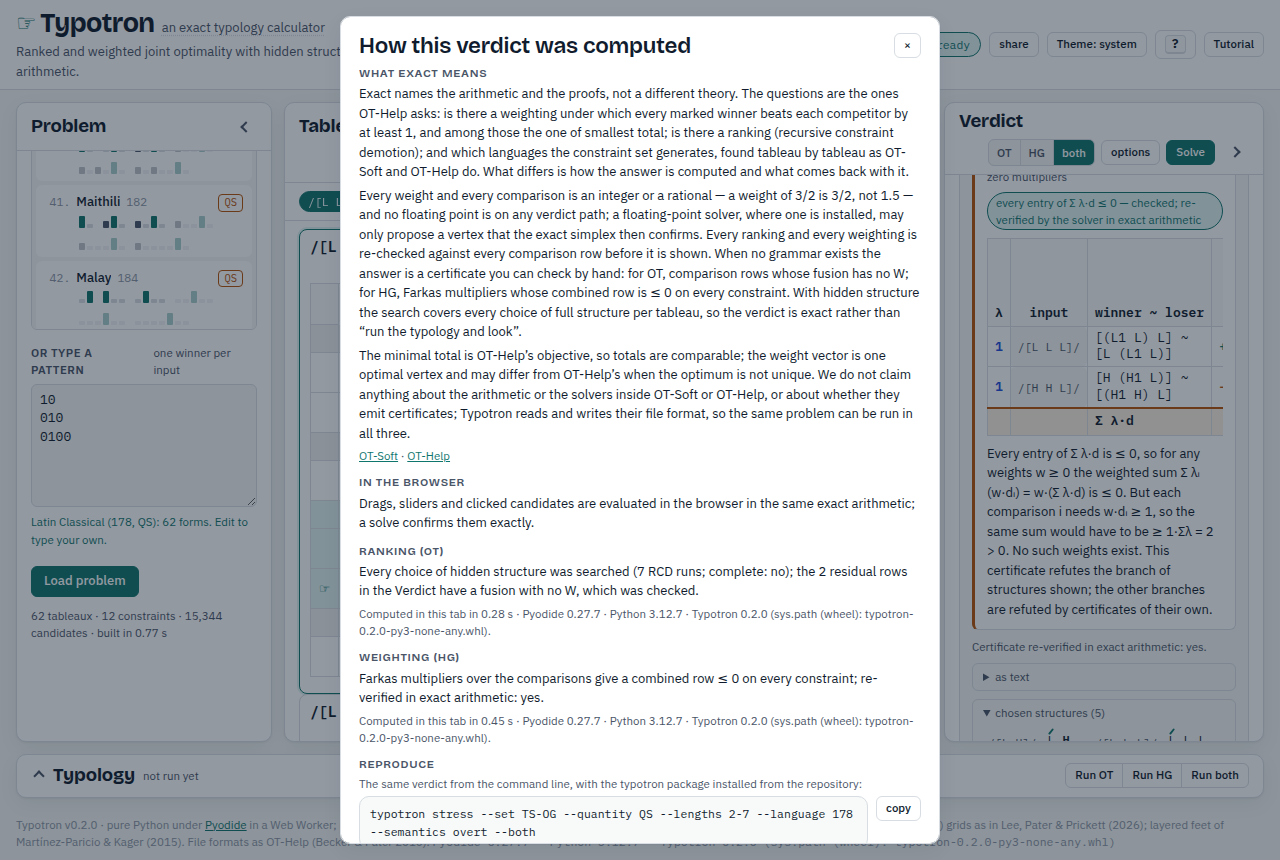
The page runs the same Python package as the command line, so every verdict on screen can be reproduced off it. The Reproduce section of the dialog gives the exact command for the loaded problem, options included; copy takes it. For Latin under TS-OG on the 62 QS inputs it is
typotron stress --set TS-OG --quantity QS --lengths 2-7 --language 178 --semantics overt --bothand for a pasted file it is typotron solve NAME with the theory flag, where NAME is what you typed in the Name field of the Import file tab (in quotes) and the file of that name is the text you pasted; a --semantics flag appears only when you overrode the file's own convention. For the OT-Help manual example the dialog prints typotron solve "othelp-manual" --both.
The package installs from the repository with Python 3.10 or later and no other dependency:
git clone https://github.com/accstack/typotron typotron && cd typotron
pip install -e .
Its commands are typotron solve FILE (joint optimality of a file's marked winners, or --winners), typotron typology FILE (every pattern the file's constraints generate; --csv writes the table), typotron stress --set S … (a built-in problem: --language, --pattern, or --typology) and typotron formats (the file formats read and written). --ot alone runs the ranking solver, --hg alone the weighting solver, neither or --both runs both; -q prints the verdicts only, --json and --markdown change the format. Two of the guide's examples:
typotron stress --set TS-Rev --language 178 --hg -q
typotron solve kata.txt --winners "katá,piká" --ot
From Python, typotron.io.otsoft.read_json(path) returns a dataset and a target, and typotron.core.ot.solve_ot(ds, target) and typotron.core.hg.solve_hg(ds, target) return the same results as the command line; typotron.core.typology.compare compares the typologies of two sets on the same inputs. The user guide in the repository (docs/USER_GUIDE.md) describes every option and the file formats in full.
Back to Typotron. Constraint sets: Tesar & Smolensky (2000); Lee, Pater & Prickett (2026); Gordon (2002); Martínez-Paricio & Kager (2015). Languages: StressTyp2 (Goedemans, Heinz & van der Hulst 2015). File formats as OT-Help (Staubs, Potts, Pratt, McCarthy & Pater 2010; user guide by Becker & Pater).