The catalog and Typotron share three lists of languages, A, B and C. You tick languages into a list on the catalog page, open the list in Typotron, and there pick a language to load its stress strings or run the whole list against a constraint set. This page walks that path once, with Finnish, Malayalam and Mandarin as the running examples, and ends with the places where it stalls.
1What moves between the two pages
Each catalog entry that has a stated stress rule carries stress strings: one form per word shape, written as Typotron writes its winners. Quantity-insensitive languages have numeric strings (1 0, 1 0 0: 1 for main stress, 2 for secondary, 0 for none), weight-sensitive languages have L/H strings with the stress mark after the syllable (L1 L, H1 L, L H1 L). A list is a set of catalog languages with those strings. The three lists A, B and C are kept by your browser, not by a server, under one key that both pages read; that is why they only pass between the pages when both are open at accstack.org, signed in, in the same browser.
Languages without stress strings (tone languages, lexical stress, undetermined entries) can be listed but cannot be loaded as a problem: Typotron needs a winner for every input.
2Tick languages into a list
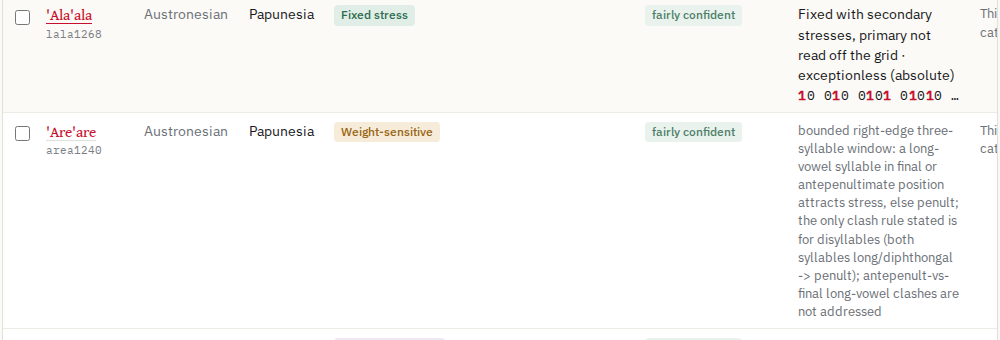
- On the catalog page, find a language (the search box takes a name or a Glottocode) and tick the box at the left of its row. The tick puts it in the list being edited; Editing: A in the bar says which one.
- Click a pill (A, B, C) to edit another list. A pill's number is the size of its list. Show only this list narrows the table to the list's members.
- The bar counts how many members carry stress strings; the others will be listed in Typotron but cannot be loaded (section 6).
3Open the list in Typotron
Click Open A in Typotron (the button names the list being edited). It opens Typotron in a new tab on the Language sets panel with the list showing, and a note at the top of the panel says what arrived: Opened A from the catalog: 3 languages when the list was already in this browser, or Merged “A” into A: 2 added, 1 updated, 0 frozen kept when the link brought languages the list did not have. The link carries up to 200 languages; a larger list downloads as a file instead, which you import with the Import control lower in the panel (section 8).
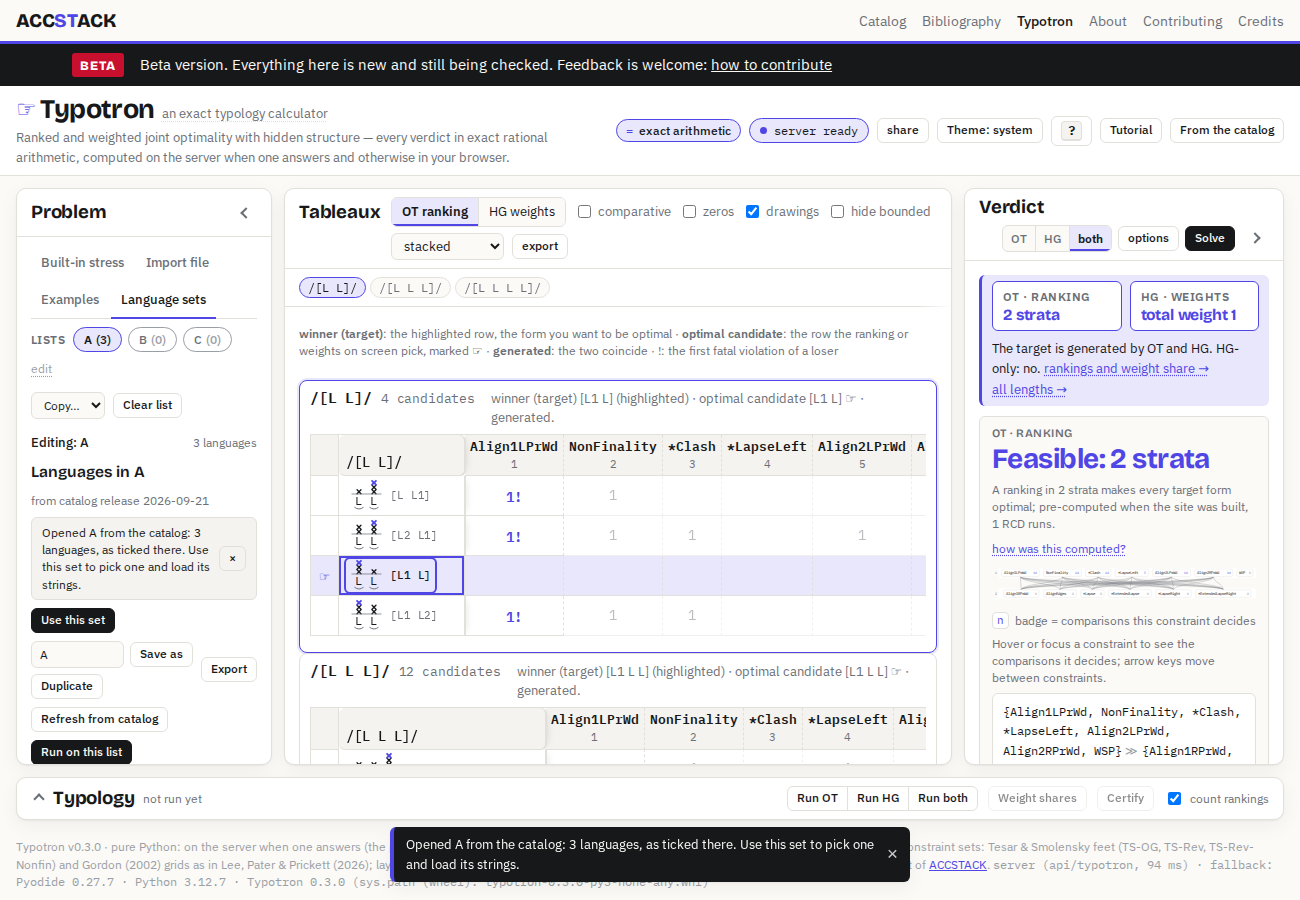
4The Language sets panel
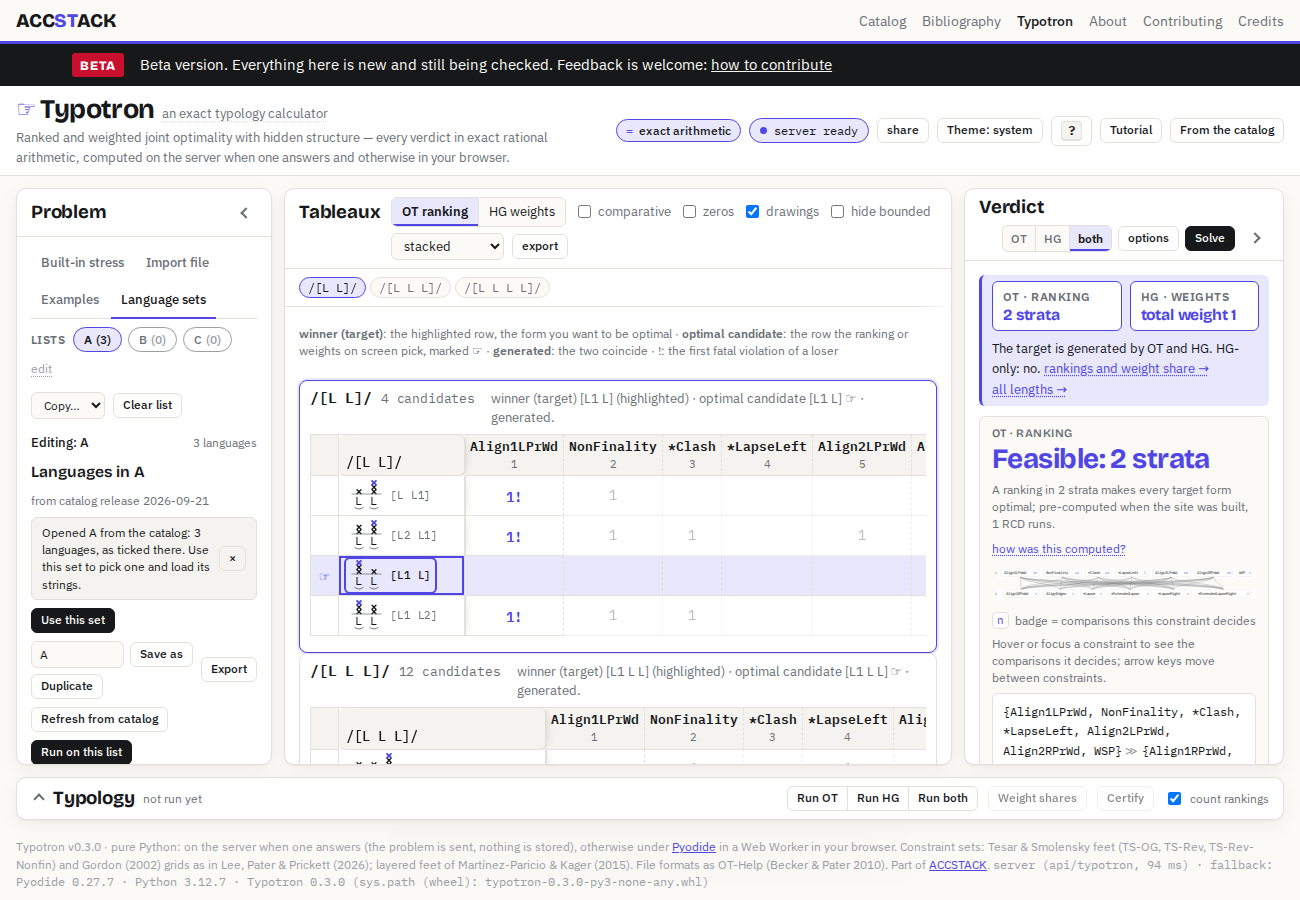
Under the pills the panel shows the list being edited, then two buttons and the list itself.
- Use this set puts the list in the language list of the Built-in stress tab, where picking a language loads its strings (section 5).
- Run on this list computes the typology of the constraint set chosen on the Built-in tab and marks each language covered or not (section 7).
- Each row has a tick (membership: an unticked language stays in the list but is left out of runs and hand-offs), a freeze button (a frozen language is left alone by every copy, import and refresh, so an edited string survives) and × to remove it.
- Add from the catalog takes a name or a Glottocode and adds the language with its current strings, without going back to the catalog page. Refresh from catalog re-reads the strings of every unfrozen language from the catalog release baked into this page.
- Copy… merges one list into another or replaces it; Clear list empties the unfrozen part of the list being edited. Save as and Export keep a copy under Other saved lists or as a file.
5Use this set and pick a language
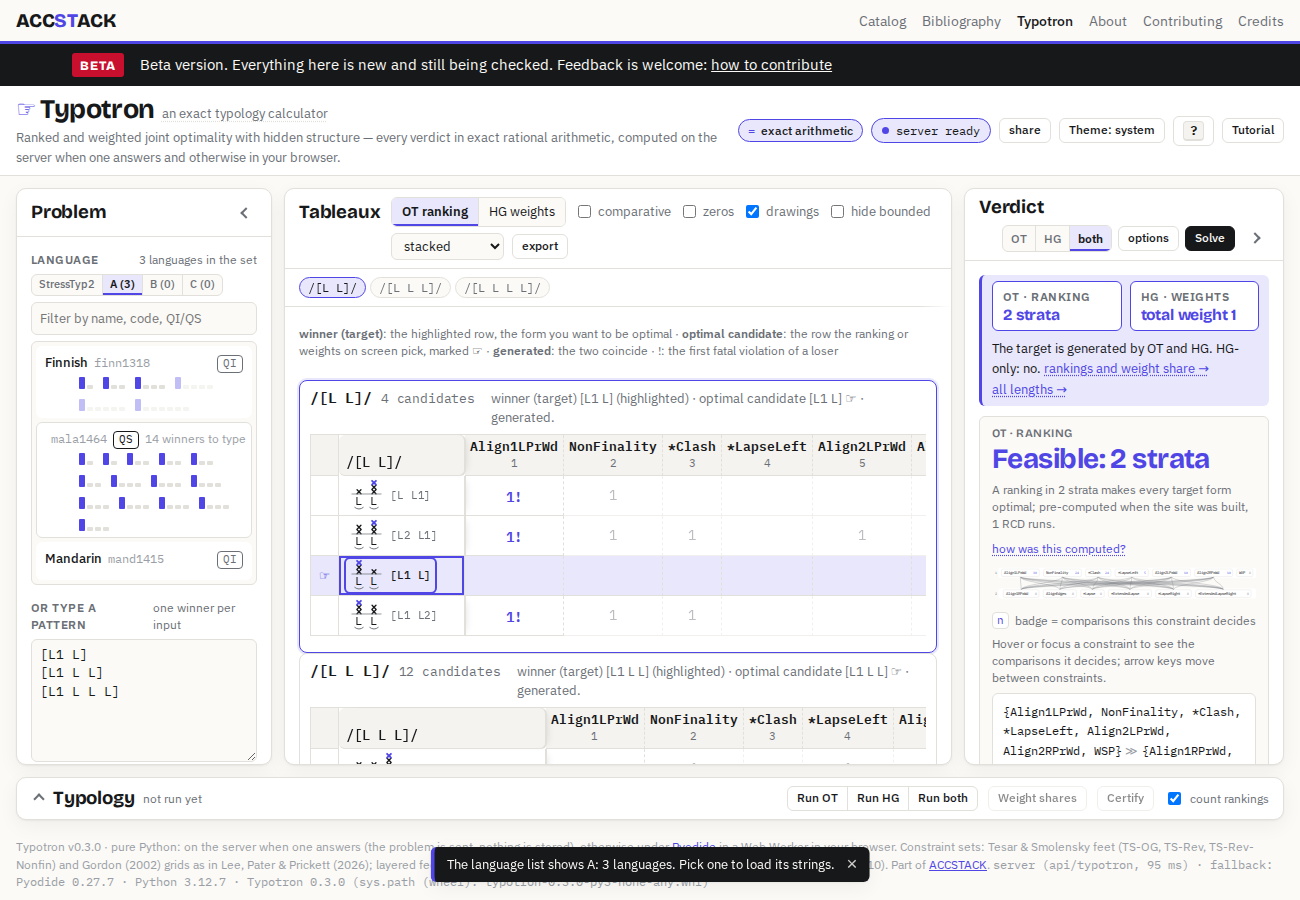
- Click Use this set. The page switches to the Built-in stress tab; in its Language section the source pill A is chosen and the list's languages appear as cards. The same pills sit there at any time, so you can also just click A in that section.
- Click a card. Its strings become the pattern (one winner per input, in the pattern box below the cards), the word lengths follow the strings, and the solver runs on the constraint set chosen above. Finnish loads as six forms, initial stress on every length, and the verdict comes back in under a second.
- Everything on the page now works as in the tutorial: drag constraints, slide weights, change the constraint set, run the typology, share the view.
![Finnish loaded from list A: the pattern box holds [L1 L], [L1 L L] and the longer forms, the tableaux show one per word length, and the Verdict pane says Feasible: 2 strata under OT and total weight 1 under HG.](screenshots/catalog-guide/05-finnish-loaded.png)
6Languages that do not load
![Malayalam picked from list A: its card says 14 winners to type, and the pattern box shows the winners it has, [L1 L] and [H1 L], with a question mark on the lines for the inputs the catalog has no string for.](screenshots/catalog-guide/06-malayalam-missing.png)
Two kinds of language stall here.
- A weight-sensitive language whose strings do not cover every input. Typotron's QS inputs are every L/H word shape of two to four syllables, 28 in all. The catalog's string sets were derived from each entry's stated rule and left out the shapes that reading did not decide, so many entries cover only part of the 28. The card says how many are missing, and the pattern box shows a question mark on those lines. To run the language now, type a winner on each of those lines (the rule in the catalog entry usually decides them). The next catalog release carries tables re-derived over every shape for all 418 weight-sensitive entries, with the shapes the source genuinely does not decide listed in the entry; after it, most of these question marks go away.
- A language without stress strings. Tone languages, lexical and morphological stress, undetermined and variable entries carry no strings. Their cards say no valid string, and picking one only shows a message. They can stay in the list for the record; they are skipped by runs.
7Run on this list
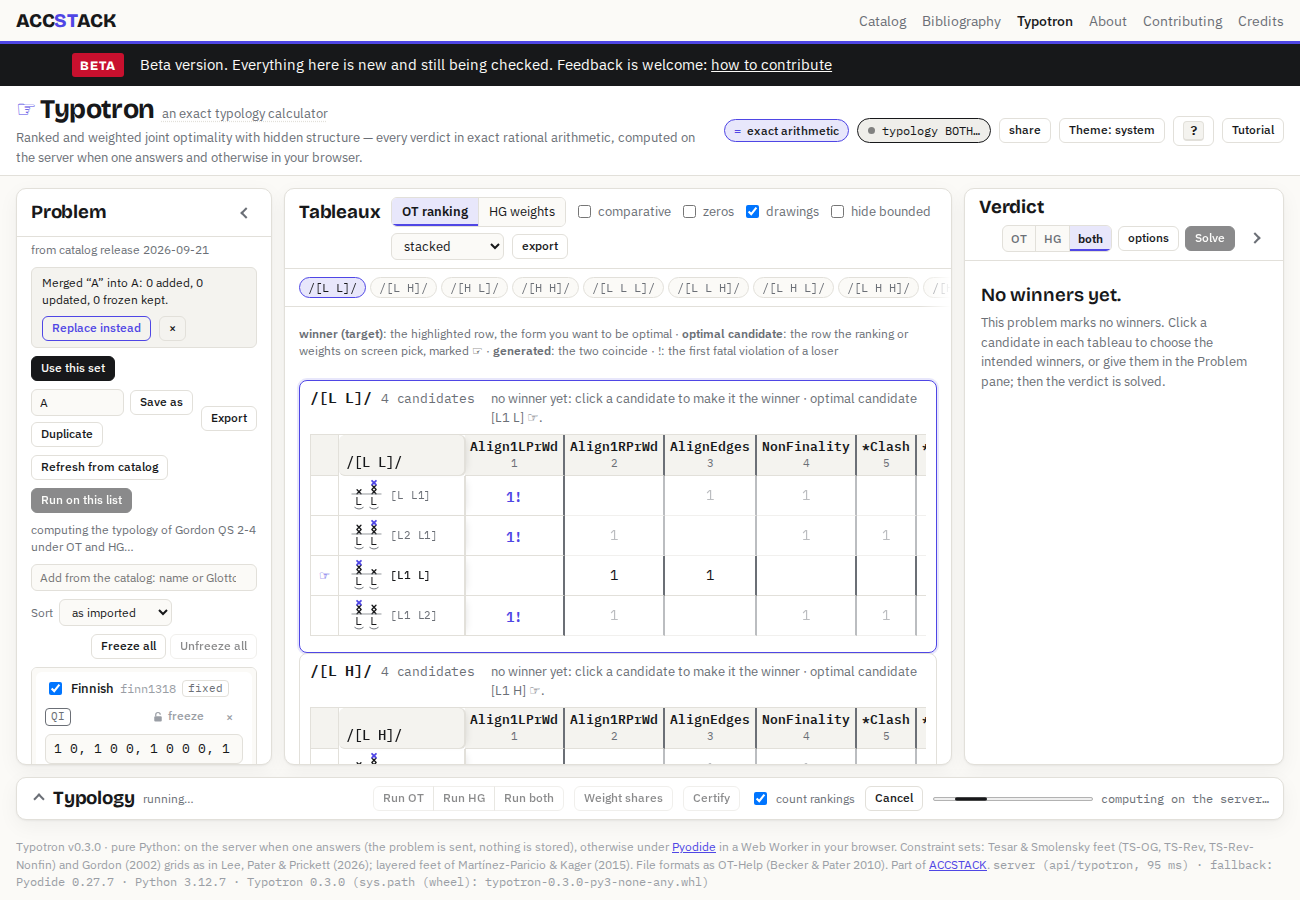
Back on the Language sets tab, Run on this list asks a different question from picking one language: for the constraint set chosen on the Built-in tab, which of the listed languages does its factorial typology generate? The page computes the typology under the theories selected in the Verdict pane (OT, HG or both), then marks each ticked language covered or not covered with the pattern that matched. A typology of Gordon's grid on the QS inputs takes from seconds to a few minutes on the server; the summary line reports progress and the marks appear on the rows when it is done. A language with missing strings is compared on the inputs it has; a language with no strings is skipped.
8Other ways in: files, pastes, the search box
- Import (lower in the panel) takes a
.jsonlanguage set: the file the catalog downloads for a list of more than 200 languages, or a file exported from Typotron. It merges into the list being edited; the note offers Replace instead. - Paste takes the same JSON from the clipboard.
- Add from the catalog adds one language by name or Glottocode, from the catalog release baked into this page (its date is shown under the list's name).
- The catalog page's own Typotron button in the site strip opens Typotron without a hand-off; because the lists live in the browser, the lists you ticked are there anyway when both pages are on
accstack.org.
9What can go wrong
- The list is empty in Typotron although you ticked languages. The two pages were not on the same address. The lists live in the browser under one key per site, so
accstack.org/catalog/andaccstack.org/typotron/share them, while a page opened at avercel.apporgithub.ioaddress has its own empty copy; the panel says so in a line under the pills. Open both ataccstack.org, signed in. A private window, another browser or another device starts with empty lists too; the hand-off link still carries the languages, so Open A in Typotron works across those, up to 200 languages. - The note says Opened A from the catalog: 3 languages and nothing seems to happen. Nothing needed to happen: the catalog page had already written the list to this browser. Click Use this set, then a card.
- The card says N winners to type and the tableaux do not change. The language's strings do not cover every input; see section 6.
- The card says no valid string. The entry has no stress strings (tone, lexical, undetermined); it cannot be loaded.
- The strings look older than the catalog's. The page carries the catalog release it was built with (the date under the list's name). Refresh from catalog re-reads unfrozen languages from that release; a hand-off from the live catalog page brings the live strings.
- A string you edited came back. Freeze the language after editing it; unfrozen languages are updated by every hand-off, copy and refresh.
- Nothing on the page responds. The status pill in the masthead must read server ready or solver ready; while it reads loading the solver… the buttons wait. The tutorial covers browsers without WebAssembly.
Back to Typotron · The tutorial · The catalog. Languages and strings: AccStack, Word stress and tone (Schwartz, Ryan, Gordon & Pater), the release named under the list.